
New Acellus Feature: Customizable Class Defaults
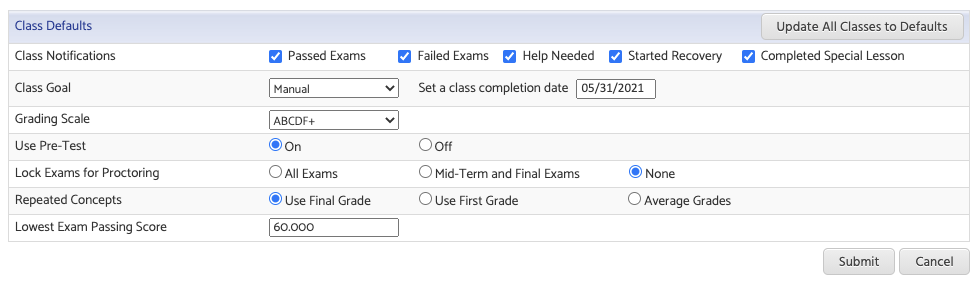
When creating classes in Acellus, Default Class Settings are provided to make setting up classes as simple as possible. These defaults can now be configured by School Administrators under the “School Settings” page from the Set-Up tab.
By adjusting the Class Defaults for a particular school, Administrators are able to choose which features should be enabled by default, as well as use the “Update All Classes to Defaults” to update existing classes.
This is especially useful when Exams must be Proctored, or when a global Course Completion Date needs to be set or updated.
Furthermore, these defaults can be configured while using the “SIS School Sync” allowing schools to further customize how their new classes will be imported into Acellus.
Recommended Posts

New Acellus Course: Grade 3 Language Arts/Reading
July 13, 2026

New Acellus Course: America: The Forging of a Nation
July 13, 2026

New Acellus Course: Conspiracy Theories
June 4, 2026